
Innova 5610: Erasing Diagnostic Trouble Codes
Erasing DTCs
When the 5610's ERASE function is used to erase DTCs from the vehicle's onboard computer, Freeze Frame data, and other manufacturer-specific-enhanced data are also erased. Permanent DTCs are not erased by the ERASE function.
Make sure that If you plan to take the vehicle to a service center for repair, do not erase the codes from the vehicle's computer. If the codes are erased, then valuable information that might help your service technician to troubleshoot the problem will also be erased.
When Check Engine DTCs are erased, the I/M Readiness Monitor Status resets the status of all monitors to a no-run condition. To properly set all monitors to a Done status, an OBD2 Drive Cycle must be performed.
Step 1 - Viewing Check Engine code(s) to erase
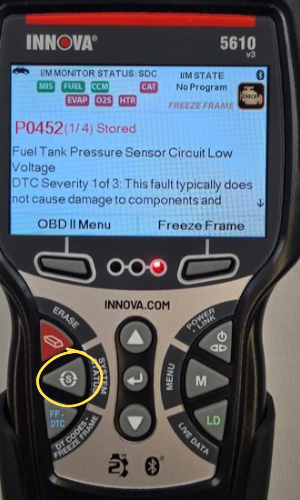
- The 5610 defaults to the Global Check Engine screen once communication has been established with the vehicle. Any Global Check Engine code(s) stored in the vehicle's ECU will display.
- If you want to erase codes from other modules like ABS or SRS for example, press the System Status button to access the module you wish to scan & erase stored DTCs from.
- Press the System Status button if you leave the default screen and want to get back to viewing any stored Global Check Engine code(s).
- Wait until the codes are displayed before erasing.
Step 2 - Press and release the ERASE button
|
|
|
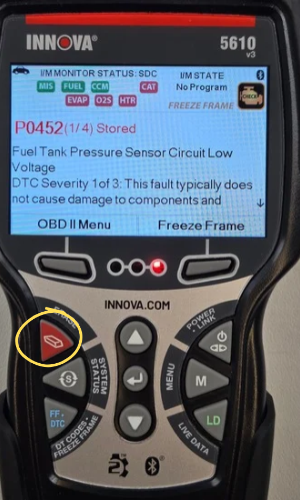
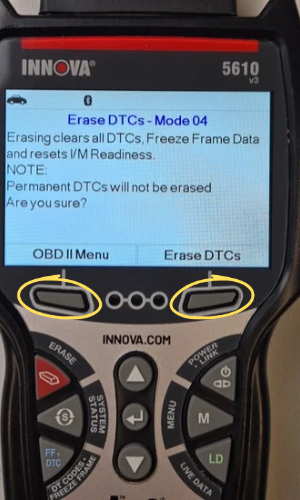
- After viewing your codes, press the ERASE button.
- A confirmation message will show.
- If you are sure you want to proceed, select the ERASE DTCs button to continue.
- If you do not want to proceed, select the OBD II Menu to go back and cancel the erase procedure.
Step 3 - One Moment Please message displays while in progress
|
|
|
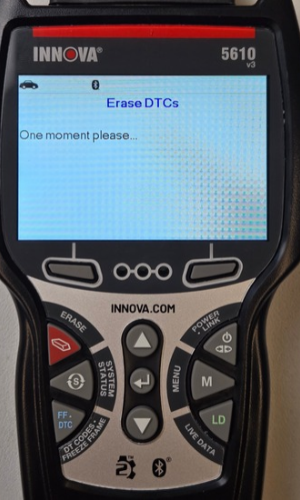
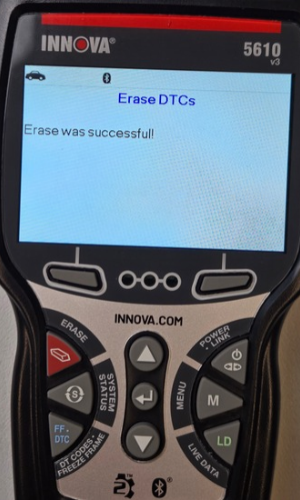
- If you chose to erase DTCs, a One moment please message will display while the erase function is in progress.
- If the vehicle’s engine is running, an advisory message will show. Turn the engine Off, then turn the ignition back On. Do not start the engine. Select Erase DTCs to continue.
- If the erase was successful, a confirmation message will show. The scan tool will automatically relink to the vehicle’s computer after 3 seconds.
- If the erase was not successful and ECU error code $22 is present, an advisory message will display. Select Erase DTCs to try again.
- If the erase was not successful, an advisory message will show indicating that the erase request was sent to the vehicle’s computer. The scan tool will automatically relink to the vehicle’s computer after 3 seconds.