
Innova 5610: Scanning & Viewing ABS codes
Step 1 - Press the System Status button
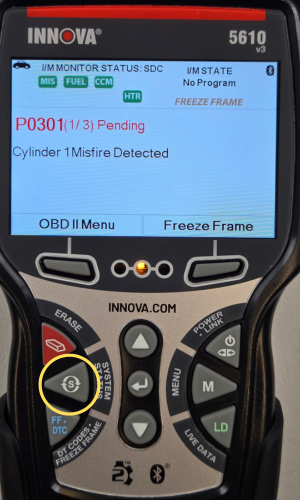
- Press the System Status button to navigate to the System Menu.
Step 2 - Scroll down to ABS

- Scroll down the options by pressing the DOWN ▼ button, then select ABS, then press ENTER ↵.
Step 3 - Select Read DTCs

-
Select Read DTCs.
A One moment please message will display while your 5610 retrieves your ABS DTCs. Wait until the scan is 100% complete.
If the 5610 fails to link to the vehicle’s computer, a Communication Error message will show.
- Ensure your vehicle is OBD2 compliant.
- Verify the connection at the DLC port and that your ignition is turned On.
- Turn the ignition Off, wait 5 seconds, then turn the ignition back On to reset the computer.
- Press the POWER/LINK button to continue.
- If the 5610 cannot link to the vehicle’s computer after three attempts, the Contact Technical Support message will display.
- Press the System Menu button to return to the System Menu.
- Turn the ignition off, and disconnect your Scan Tool from the DLC Port.
- Contact Technical Support for assistance.
- Press the Back button to return to the System Menu.
Note: If ABS functionality is not supported, an advisory message will show.
Step 4 - Press UP▲ or DOWN▼ to scroll through your ABS codes
|
|
|


- After your tool finishes scanning, press the UP ▲ and DOWN ▼ buttons to scroll through the ABS codes.
- You may refer to Display Functions for a description of each display element. When the last retrieved DTC has been displayed press the DOWN ▼ button again to return to the first code.
- If the definition for the currently displayed code is not available, an advisory message will show.
- In the case of codes with long definitions, a small arrow will show in the upper/lower right-hand corner of the screen to indicate the presence of additional information.
- If no codes are present, the message No ABS DTCs are presently stored in the vehicle’s computer will show.
- To exit the ABS screen, press the Diagnostic Menu button to return to the Diagnostic Menu.
The images below show how Ford displays their ABS codes:
NOTE: Ford organizes and names its diagnostic architecture differently by explicitly separating testing into distinct phase:
- Key On Engine Off (KOEO) and Key On Engine Running (KOER) tests, which are on-demand self-tests.
- Continuous Memory Diagnostic Trouble Codes (CMDTCs), which come from an always-active background self-test that runs passively while the vehicle is driven or parked with the key on.

Step 5 - To return to your ABS codes, press the FF/DTC button

- To return to your ABS codes after pressing any button, press the FF/DTC button to re-display your ABS codes.
- If the 5610's communication with the vehicle's computer disconnects, press POWER/LINK again to re-establish communication.
- Press the Diagnostic Menu button to return to the Diagnostic Menu.