
Innova 3215RS: How to scan for SRS codes
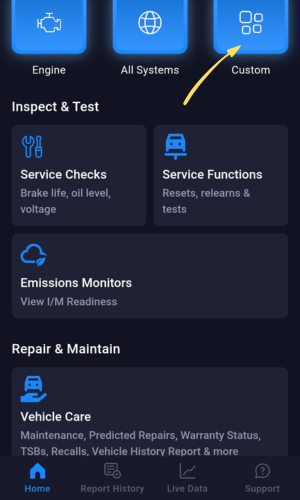
Step 1 - Select Custom
-
You can now scan codes for specific modules.
Select Custom to open a list of modules that you can manually scan and check for DTCs.
Step 2 - Select Airbags (SRS)
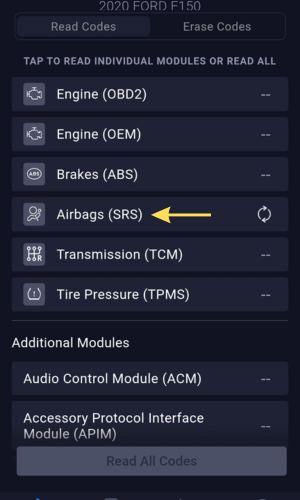
- Select Airbags (SRS) from the list.
Step 3 - Read Airbags(SRS) codes
- Tap Airbags (SRS) to view all the codes stored in the vehicle's SRS module. An arrow icon will spin while the SRS codes are being read from the SRS module.
Step 4 - View Airbags(SRS) codes and their Descriptions.
|
|
|
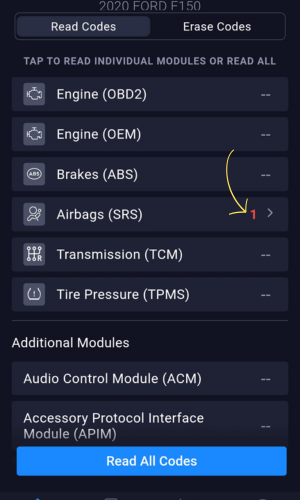
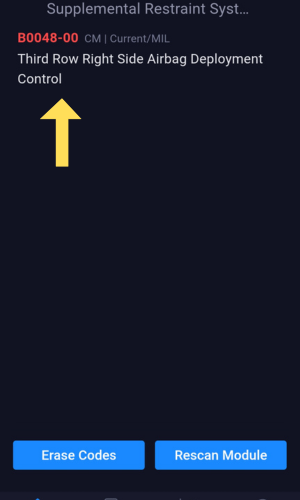
- Select the link showing the number of codes.
- You may now view the report page for the SRS codes.