
Innova 5610: Scanning & Viewing Transmission DTCs
Step 1 - Press the System Status button
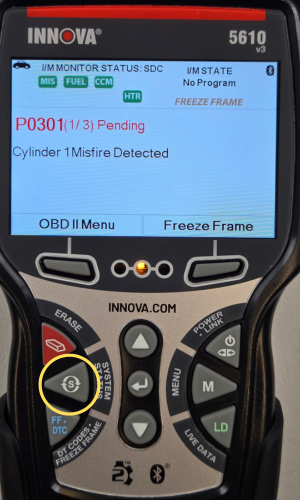
- Press the System Status button to go into the System Menu.
Step 2 - Select TCM, then press ENTER ↵
|
|
|


- The System Menu will display. Select TCM then press ENTER ↵.
- A One moment please...message will display while the TCM DTCs load on the screen.
Step 3 - View Transmission DTCs

- Wait until the auto-link status is 100% completed. The Innova 5610 will display a transmission code only if present. If no codes are present, the No Transmission DTCs presently stored in the vehicle’s computer will display.
- Refer to Display Functions for a description of display elements. In the case of codes with long definitions, a small arrow is shown in the upper/lower right-hand corner of the display area to indicate the presence of additional information. If a definition for the currently displayed code is not available, an advisory message will show.
- Press the DOWN ▼ button to view more of the code description, if applicable.
- Each time the DTC/FF is pressed and released, the 5610 will scroll and display the next DTC in sequence until all DTCs in its memory have been displayed.
Note: When the last retrieved DTC has been displayed, press the DTC/FF button or the DOWN ▼ button to return to the first code.
- Press the Diagnostic Menu button to return to the System Menu.