Innova 1000: How to Read OEM Engine Codes
Step 1 - Select Custom.
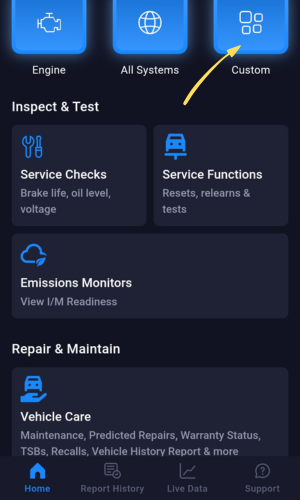
- Select Custom to open a list of modules to manually scan.
Step 2 - Select the Engine(OEM).
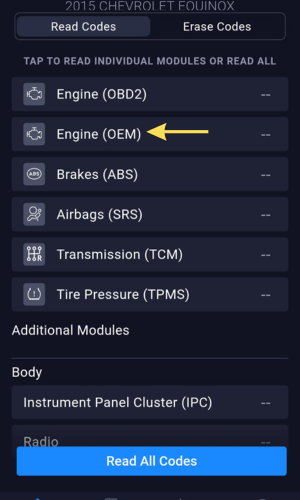
- Select Engine(OEM) from the list.
Step 3 - Engine(OEM) Codes will Display.
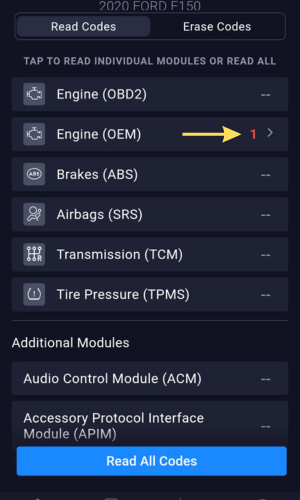
- After selecting Engine(OEM) from the list, the number of codes stored will display.
Step 4 - View Engine(OEM) Code Descriptions
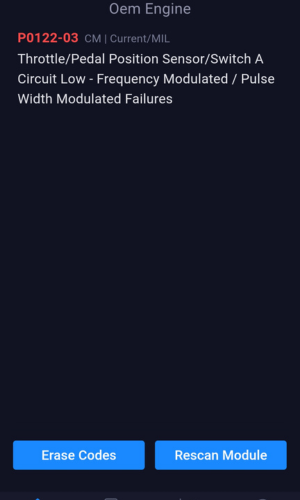
- Select the link showing the number of codes.
- You can now view all stored Engine(OEM) codes with their descriptions.
Did this answer your question?
Thanks for the feedback
There was a problem submitting your feedback. Please try again later.
No results found

