
Innova 5610: Battery Initialization
The following paragraphs provide procedures for performing battery reset OBD service on BMW, Ford, Volvo, and Audi/Volkswagen models.
1. Press the M button

- Press the M button.
2. Select Service Reset
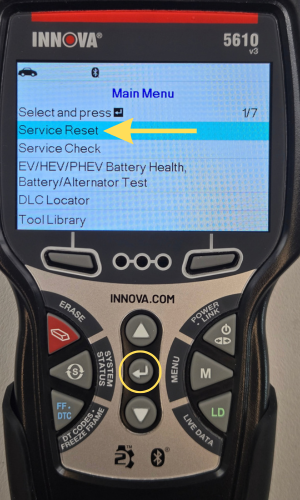
- The Main Menu displays.
- Select Service Reset, then press ENTER ↵.
3. Select Battery Initialization, then press ENTER ↵
|
|
|
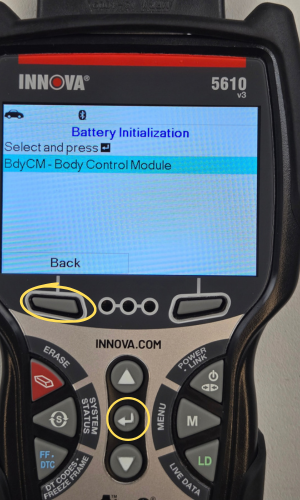
- The Service Reset menu displays.
- Select Battery Initialization, then press ENTER ↵.
- Next, select BdyCM - Body Control Module, then press ENTER ↵.
- A One moment please… message displays.
- Press the Back button to return to previous screen.
NOTE: Many modern vehicles use the Body Control Module (BCM)—or a dedicated submodule attached to it, like a Battery Monitoring System (BMS) or Intelligent Battery Sensor (IBS)—to handle battery initialization, registration, and coding
4. Select the Battery Reset Service option, then press ENTER ↵
|
|
|
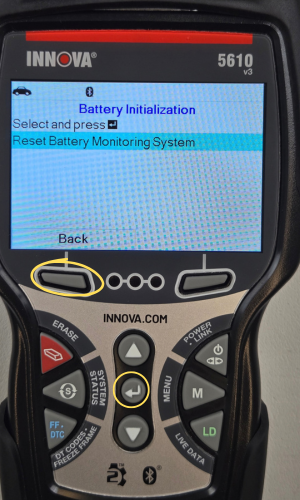
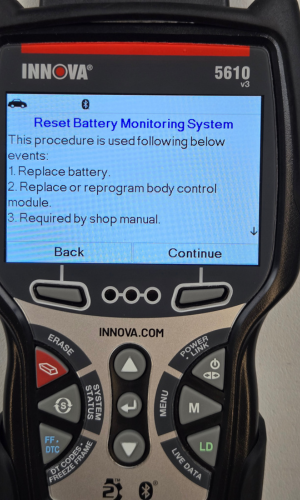
- Select Reset Battery Monitoring System.
- An instructional message displays.
NOTE: In this demonstration, Battery Initialization is being performed on a 2018 Ford Explorer.
5. Follow the instructions provided
|
|
|
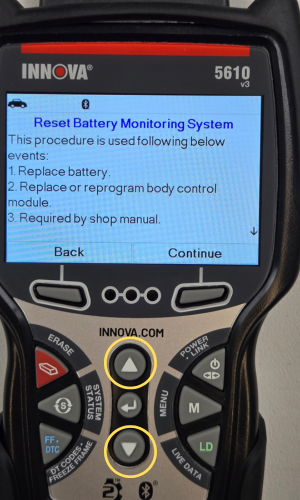
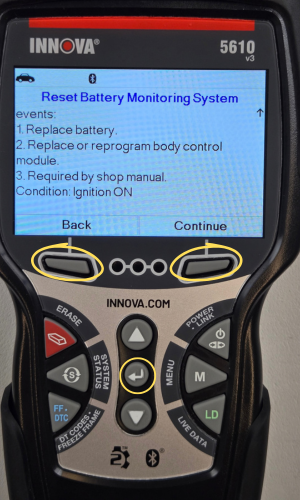
- Follow instructions on screen to complete the reset.
- Press the UP ▲ & DOWN ▼ buttons to navigate through the instructions.
- Press Back to return to the previous screen or Continue to proceed.
6. Reset Complete displays if successful
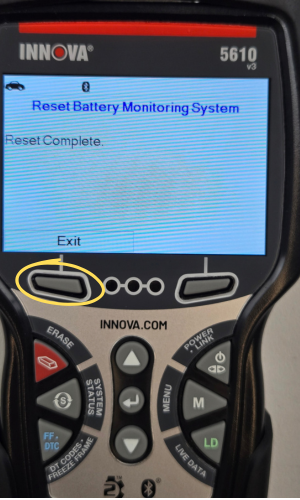
- A One moment please… message displays while battery reset is in process.
- Choose Exit to return to the Main Menu.
- If the battery reset process is not successful, a Reset Fail message displays. Choose Back to return to the Battery Reset Menu.
To Perform Battery Reset OBD Service (Audi/Volkswagen):
1. While linked to a vehicle, press M
- The Main Menu displays.
2. Select Service Reset, then press ENTER ↵

- The Service Reset menu displays.
- Select Service Reset, then press ENTER ↵.
3. Select Battery Initialization, then press ENTER ↵
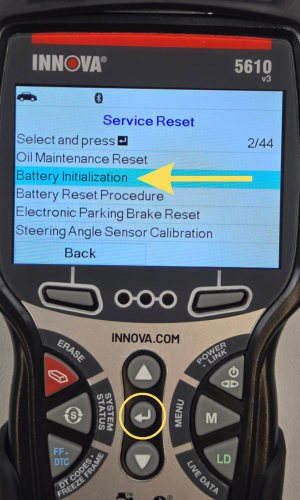
- Select Battery Initialization, then press ENTER ↵.
4. Select Battery Adaptation, then press ENTER ↵
- An informational screen displays.
5. Choose Next to continue
- A series of instructional screens display, directing you to enter reference information for the battery (part number, manufacturer, serial number).
6. Enter the necessary information
- A confirmation screen displays.
- The screen displays the previously entered Battery part number, Battery manufacturer and Battery serial number.
7. Select the desired option
- To proceed with coding, select Carry out coding and press ENTER ↵. Proceed to step 8.
- To re-enter battery reference information, select Repeat input and press ENTER ↵. Repeat steps 4 and 5.
- To cancel the battery reset process, select Cancel and press ENTER ↵to return to the Battery Reset Menu.
- If battery coding was successful, a confirmation screen displays. Choose Back to return to the Battery Reset Menu.
- If battery coding was not successful, an advisory screen displays. Choose Exit to return to the Main Menu.