
Innova 5610: Oil Maintenance Reset
Step 1 - Press the M button
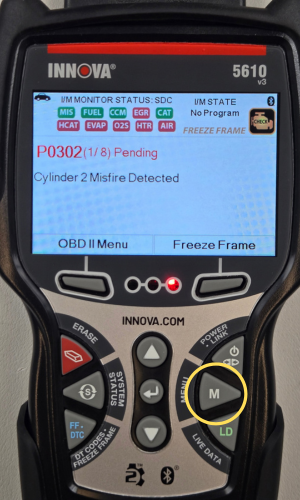
- Press the M button to access the Menu.
Step 2 - Select Service Reset
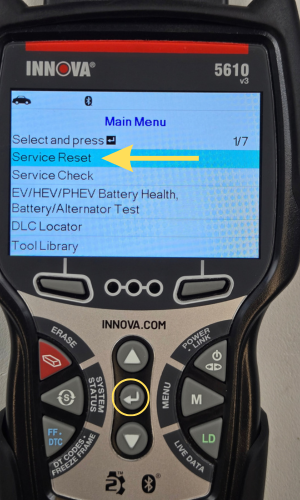
- Select Service Reset, then press ENTER ↵.
Step 3 - Select Oil Maintenance Reset
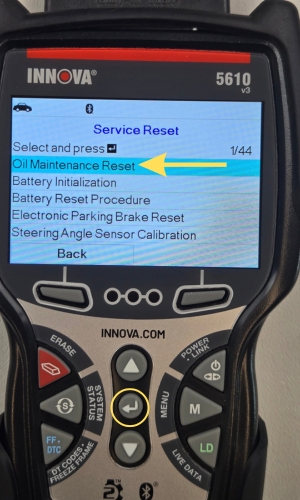
- Select Oil Maintenance Reset, then press ENTER ↵.
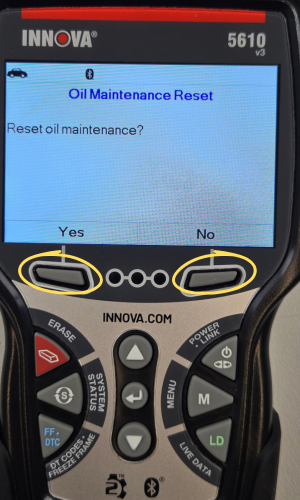
- The Oil Maintenance Reset screen displays. Select Yes to continue, or No to cancel.
NOTE: If the 5610 cannot reset the Oil Maintenance Light, an instructional dialog displays, showing the manual procedures for resetting the indicator light.
Step 4 - Oil Maintenance Reset has Completed
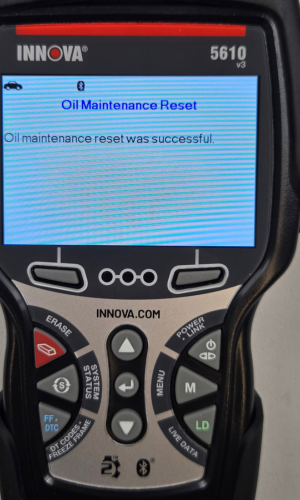
- When the reset process has completed, a confirmation message displays.
Step 5 - Oil Maintenance Reset not Successful
- If the Oil Maintenance Reset was not successful, an advisory message displays
- To perform the oil reset by procedure, select Yes, then press ENTER. Procced to step 6.
- If you do not wish to perform the oil reset by procedure, select No, then press ENTER to return to the Main Menu.
Step 6 - Oil Reset Procedures
|
|
|
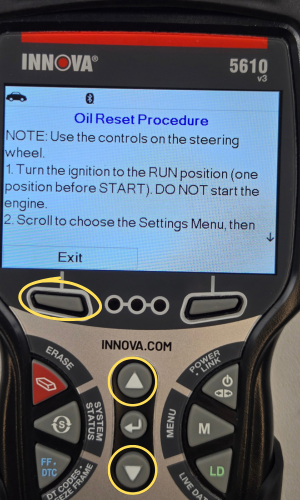
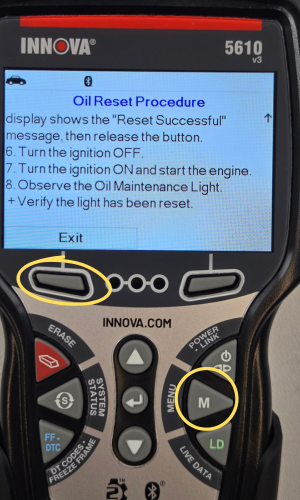
- An instructional message displays, showing the manual procedures for resetting the indicator light.
- Press the UP ▲ and DOWN ▼ buttons to scroll through the procedures.
- When finished viewing the instructions, press EXIT to leave the screen or M to return to the Main Menu.