
Innova 5610: EV/HEV/PHEV Battery Health
EV/HEV/PHEV BATTERY HEALTH, BATTERY/ALTERNATOR TEST
The 5610 can perform a check of the vehicle’s battery and alternator system (or hybrid/EV battery system) to ensure the system is operating within acceptable limits.
Step 1 - Press the M button
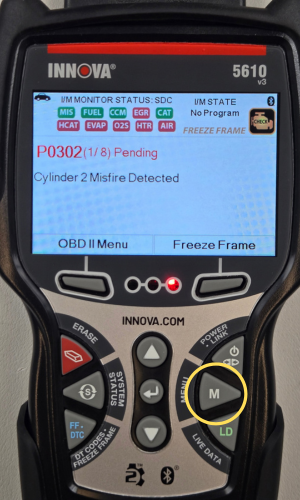
- Press the M button to access the Menu.
Step 2 - Select EV/HEV/PHEV Battery Health, Battery/Alternator Test
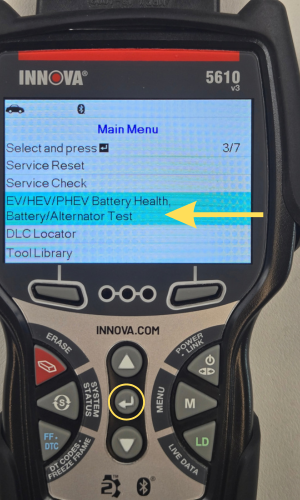
- Select EV/HEV/PHEV Battery Health, Battery/Alternator Test, then press ENTER ↵.
- If the vehicle is an electric or hybrid vehicle, the EV/HEV/PHEV Battery Health menu displays.
- If the vehicle is not an electric or hybrid vehicle, the Battery/Alternator Test menu displays.
NOTE: If the Hybrid/EV Battery Test is not supported by the vehicle under test, an advisory message displays. Press M to return to the Main Menu.
Step 3 - Select EV/HEV/PHEV Battery Health
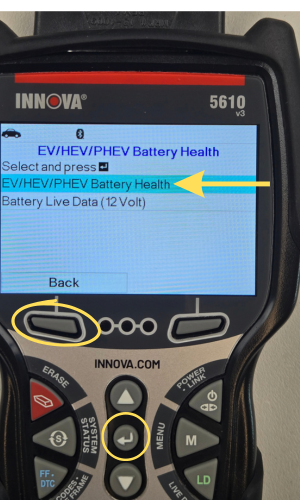
- Select EV/HEV/PHEV Battery Health, then press ENTER ↵.
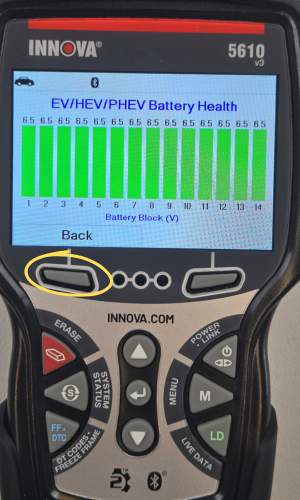
- A graphic display of the current state of charge for all cells in the battery pack displays.
- Press the Back button to return to the previous screen.
Step 3 - Select Battery Live Data (12 Volts)
|
|
|
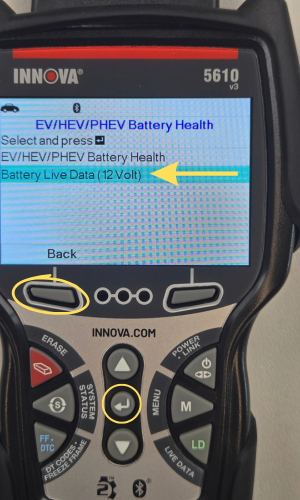
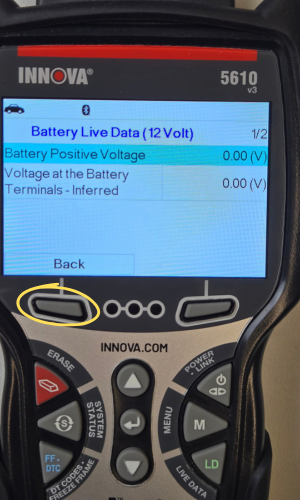
- Select Battery Live Data (12 Volts), then press ENTER ↵.
- A Battery Live Data screen displays.
- When you have finished viewing the retrieved information, press the Back button to return.