
Innova 5610: Window Door Roof
Window Door Roof
The Window Door Roof function supports configuration and calibration of various operational features of the vehicle's doors, windows and sunroof.
Support of the functions the 5610 offers always depends on the year, make, model, and engine soze of vehicle. Please visit our coverage checker to confirm compatibility.
Step 1 - Press the M button
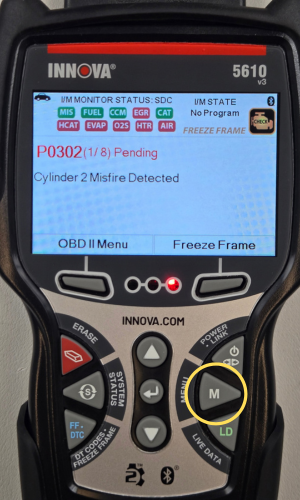
- Press the M button to access the Menu.
Step 2 - Select Service Reset
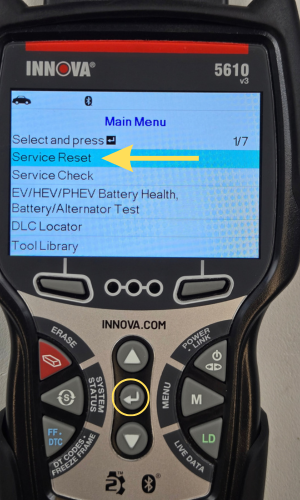
- Select Service Reset, then press ENTER ↵.
- Press the Back button to return to the Main Menu.
Step 3 - Select Window Door Roof
|
|
|


- Select Window Door Roof, then press ENTER ↵.
- A confirmation message will appear. Select Yes or No.
|
|
|


- Select Body, then press ENTER ↵.
- Select BCM - Body Control Module next, then press ENTER ↵.
- Select the Back button to return to the previous screen.
Step 4 - Select the desired Window Door Roof option
|
|
|


- The Window Door Roof Reset options will display.
- Scroll DOWN ▼ & select your desired option, then press ENTER ↵.
- Press the Exit button to return to the Main Menu.
Step 5 - Select an option to command its state

- Select the desired option, then press ENTER ↵.
- The 5610 will display a Linking to Control Unit message while establishing communication.
- Once communication has been established, follow the on-screen instructions to command the Passenger Window Motor.
- Press the Exit button to return to the Window Door Roof Reset menu.
NOTE: In this example, only the Passenger Window Motor option was selected and demonstrated. This is just to demonstrate how to navigate to the Window Door Roof Reset function under Service Resets. Support of this function depends on the year, make, model, and engine size of vehicle.